

One of the issues I had with Photoshop and Wacom drawing for a while was that, if I held my pen still on the tablet for more than half a second, it’d open the right-click menu. I often found this to be disrupting.
I found a solution to this issue, though it was hidden within the control panel settings, and wasn’t anywhere to be seen in the regular Windows 10 settings, or Wacom pen settings.
Search “Pen and Touch” in the control panel settings. Then select “Change tablet pen settings”.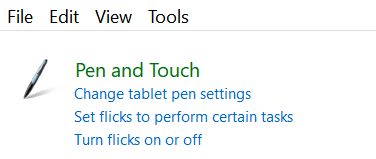
Select the “Settings” button
The “Enable press and hold for right-clicking” option is enabled by default. Disable it, and that should do it!
I sometimes tend to draw slow, and not having random right-click menus appear makes it better for me.
Note: This may only be an issue for Windows 10, and if you’re using Adobe Photoshop.
 Aloe Tortoise Artwork